CloudBurn's discover command uses AWS Resource Explorer to find resources across your AWS account. This guide walks you through setting up the indexes CloudBurn needs.
What is Resource Explorer?
AWS Resource Explorer is a service that indexes your AWS resources across regions. CloudBurn queries these indexes to build a catalog of resources, then evaluates cost optimization rules against them.
There are two index types:
| Index Type | Description |
|---|---|
| Local | Indexes resources in a single region. Allows scanning that region only. |
| Aggregator | Collects data from all local indexes across regions. Only one aggregator can exist per account. |
Step 1: Initialize Resource Explorer
Run cloudburn discover init to set up indexes across your enabled regions:
cloudburn discover init
CloudBurn creates local indexes in every enabled region and promotes the index in your current active region to the aggregator. If you're using an AWS profile or have AWS_REGION set, that region becomes the aggregator.
To explicitly choose the aggregator region:
cloudburn discover init --region eu-west-1
Expected output:
+--------------------+--------------------------------------------------------------------------------------------+
| Field              | Value                                                                                      |
+--------------------+--------------------------------------------------------------------------------------------+
| aggregatorAction   | promoted                                                                                   |
| aggregatorRegion   | eu-west-1                                                                                  |
| coverage           | full                                                                                       |
| createdIndexes     | 0                                                                                          |
| details            | Run `cloudburn discover status` for per-region details.                                    |
| indexedRegions     | ap-northeast-1, ap-northeast-2, ap-northeast-3, ap-south-1, ap-southeast-1,               |
|                    | ap-southeast-2, ca-central-1, eu-central-1, eu-north-1, eu-west-1, eu-west-2,             |
|                    | eu-west-3, sa-east-1, us-east-1, us-east-2, us-west-1, us-west-2                          |
| indexedSummary     | 17 of 17                                                                                   |
| indexType          | aggregator                                                                                 |
| message            | Promoted the existing local Resource Explorer index in eu-west-1 to the aggregator.        |
|                    | Reused 17 existing indexes.                                                                |
| reusedIndexes      | 17                                                                                         |
| status             | EXISTING                                                                                   |
| taskId             |                                                                                            |
| verificationStatus | verified                                                                                   |
+--------------------+--------------------------------------------------------------------------------------------+
If indexes already exist in your account, CloudBurn reuses them instead of creating new ones.
taskId carries the AWS setup task ID when this run created a new setup task, and is empty otherwise. A restrictedRegions row is added when some enabled regions were not accessible to the identity you ran with. verificationStatus is verified, or timed_out when setup is still converging inside AWS, in which case the reported coverage can still change.
Step 2: Verify the setup
Check the Resource Explorer status to confirm everything is ready:
cloudburn discover status
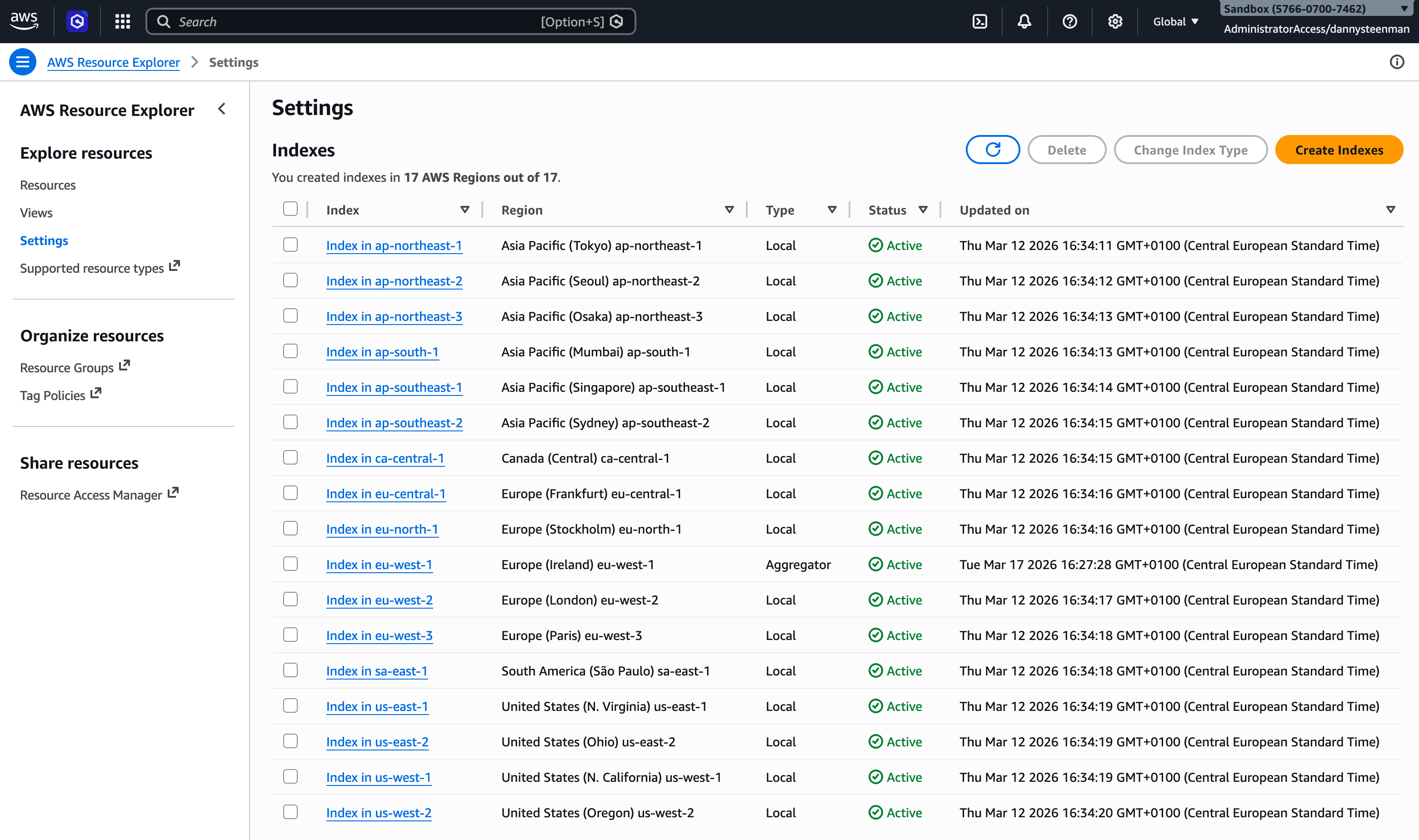
The output shows per-region index state, view status, and which region is the aggregator (output format). You can also verify this in the AWS Console under Resource Explorer > Settings:
Step 3: Run a discovery scan
With indexes in place, you can scan your resources:
# Scan resources in your current region (uses the local index)
cloudburn discover

# Scan a specific region
cloudburn discover --region us-east-1
Changing the aggregator region
Only one region can be the aggregator at a time. If you need to move the aggregator to a different region:
- Change the current aggregator's index type back to local (via the AWS Console under Resource Explorer > Settings > Change Index Type, or via the AWS CLI)
- Wait 24 hours — AWS enforces a 24-hour cooldown before you can promote a different region to aggregator
- Run
cloudburn discover init --region <new-region>to promote the new region
This 24-hour delay is an AWS limitation, not a CloudBurn restriction. Plan aggregator region changes accordingly.
IAM permissions
The IAM identity running CloudBurn needs the following permissions for Resource Explorer operations:
{
  "Version": "2012-10-17",
  "Statement": [
    {
      "Effect": "Allow",
      "Action": [
        "resource-explorer-2:CreateIndex",
        "resource-explorer-2:GetIndex",
        "resource-explorer-2:ListIndexes",
        "resource-explorer-2:Search",
        "resource-explorer-2:GetDefaultView",
        "resource-explorer-2:GetView",
        "resource-explorer-2:ListViews",
        "resource-explorer-2:ListSupportedResourceTypes",
        "resource-explorer-2:UpdateIndexType"
      ],
      "Resource": "*"
    },
    {
      "Effect": "Allow",
      "Action": [
        "ec2:DescribeRegions"
      ],
      "Resource": "*"
    },
    {
      "Effect": "Allow",
      "Action": [
        "iam:CreateServiceLinkedRole"
      ],
      "Resource": "arn:aws:iam::*:role/aws-service-role/resource-explorer-2.amazonaws.com/*",
      "Condition": {
        "StringEquals": {
          "iam:AWSServiceName": "resource-explorer-2.amazonaws.com"
        }
      }
    }
  ]
}
The iam:CreateServiceLinkedRole permission is only needed the first time Resource Explorer is enabled in a region. After that, it can be removed.
Additionally, the discovery scan itself calls read-only APIs for each service being scanned (EC2, EBS, RDS, etc.). If an API call is denied, CloudBurn reports it as a diagnostic and continues scanning other services. Every discovery run also calls sts:GetCallerIdentity once to scope shared AWS request quotas and cached evidence to the signing account; when that call is denied the run continues with isolated in-memory limits (see Environment variables).
The opt-in rules need more than this baseline: the Cost Optimization Hub rules add cost-optimization-hub:ListEnrollmentStatuses, cost-optimization-hub:ListRecommendations, and cost-optimization-hub:GetRecommendation.
What's next
| cloudburn discover | Full reference for all discover flags and subcommands |
| Quickstart: Discover AWS | Run your first discovery scan |
| AWS Credentials | How CloudBurn resolves AWS credentials |